h3c防火墙F100忘记密码
- 0关注
- 0收藏,70浏览


如果你是web界面的密码忘记了但是console能进的话,可以重新配置一个(不论是重新配置还是跳过密码,你都必须有一根调试xian)
<H3C> system-view
[H3C] local-user admin 账户admin
[H3C-luser-manage-admin] password simple Admin@1234 配置新密码为Admin@1234
[H3C-luser-manage-admin] authorization-attribute user-role leave-15
[H3C-luser-manage-admin] service-type telnet ssh http https 服务类型为web 和SSH
[H3C-luser-manage-admin] quit
你如果是web密码忘记了 同时 console密码忘记了,进不去,那就先跳过进去console之后,再按上面的来配置
console密码重置或者跳过(必须重启,不影响现有配置)
1.重启设备进入bootware菜单
重启过程中按Ctrl+B进入bootware菜单
先按8在按0,然后就可以跳过密码进入系统,然后重新配置密码
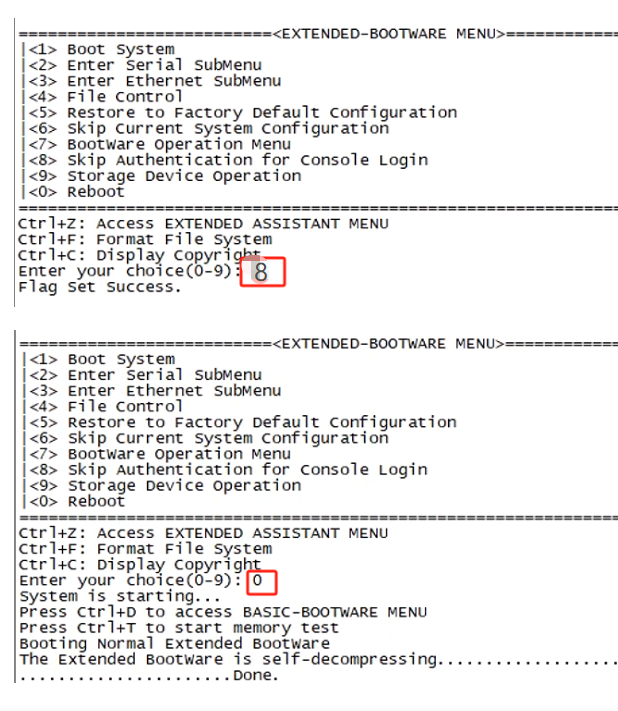
跳过密码之后进去重新配置console密码
如果仅是密码验证登陆
authentication-mode password
set authentication password simple Admin@1234
quit
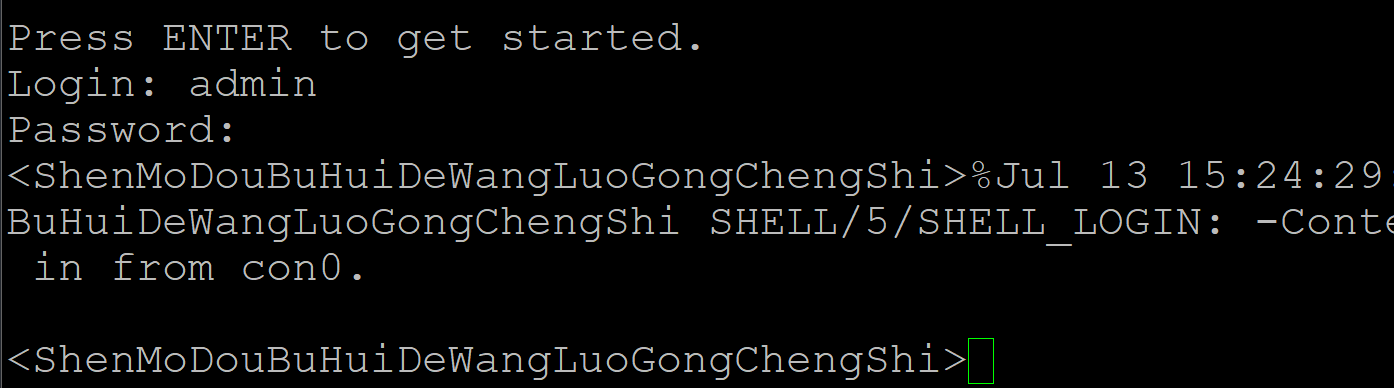
效果如下

如果是要实现用户名、密码登陆,可参考如下脚本:
local-user admin
password simple Admin@1234
service-type terminal
quit
line con 0
authentication-mode scheme
quit
效果如下


1. 用Console线连接防火墙,重启设备。
2. 启动时按Ctrl+B进入BootWare菜单(默认密码可能为空或admin,若也忘记需返厂)。
3. 选择“Skip Authentication for Console Login”或类似选项(不同版本菜单略有差异),跳过当前配置启动。
4. 启动后通过Console登录,无需密码。
5. 执行以下命令修改密码:
[Sysname] local-user admin password simple 新密码
[Sysname] save
6. 重启设备,用新密码登录。
若BootWare也有密码且无法进入,只能通过恢复出厂(会丢失配置)或联系H3C售后处理。恢复出厂可在BootWare菜单选择“Restore Factory Default”或通过Console在启动后执行restore factory-default(需能登录)。
暂无评论
F100(V7 防火墙)忘记密码不需要依赖维保,过保也可以自行操作,但必须 Console 串口,操作会重启防火墙、业务中断;分两种情况:
方案 1:还有其他管理员账号能 SSH/HTTPS 登录(优先,不重启)
system-view
local-user admin class manage
password simple 新密码
authorization-attribute user-role network-admin
service-type http https ssh terminal
save
方案 2:全部密码丢失,Console 进 BootWare 重置(重点)
- 电脑接 Console,波特率 9600,断电重启,看到提示
Press Ctrl+B to access EXTENDED-BOOTWARE MENU立刻按 Ctrl+B 进入 BootWare
先看提示:
Password recovery capability is enabled/disabled
- ✅ 密码恢复开启(出厂默认,推荐,可以保留全部配置)
新版 BootWare:选【8】Skip authentication for console login(跳过 Console 认证),再选 1 启动系统;启动后直接免密进命令行,原有业务配置全部保留,进去修改 admin 密码、save 保存。
老版本 BootWare:选【6】Skip Current System Configuration,启动后是空配置,再执行
configuration replace file startup.cfg加载原有配置文件,再改密码。 - ❌ 密码恢复关闭(安全加固过) 无法无损找回,只能选【5】Restore to Factory Default Configuration,清空所有配置恢复出厂,这个是硬限制。
修改 admin 账号密码命令(Web/SSH/Console 共用)
system-view
local-user admin class manage
password simple Admin@123456
authorization-attribute user-role network-admin
service-type http https ssh terminal
save
重要提醒(针对过保)
- 密码恢复是设备自带 BootWare 功能,和是否在保无关,过保自己就能操作;
- 操作前务必备份配置文件,防止误操作丢配置;
- 双机热备场景,不要两台同时重启,逐台处理;
- F100 系列没有外置复位小孔,不能硬件一键复位,只能 Console 方式;
- 启动后在线用户不会自动刷新,改完密码需要终端重新登录 Web。
补充
如果自己没有 Console 线、没有调试条件,虽然过保,也可以联系 H3C400 付费上门调试
暂无评论
编辑答案


亲~登录后才可以操作哦!
确定你的邮箱还未认证,请认证邮箱或绑定手机后进行当前操作
举报
×
侵犯我的权益
×
侵犯了我企业的权益
×
- 1. 您举报的内容是什么?(请在邮件中列出您举报的内容和链接地址)
- 2. 您是谁?(身份证明材料,可以是身份证或护照等证件)
- 3. 是哪家企业?(营业执照,单位登记证明等证件)
- 4. 您与该企业的关系是?(您是企业法人或被授权人,需提供企业委托授权书)
抄袭了我的内容
×
原文链接或出处
诽谤我
×
- 1. 您举报的内容以及侵犯了您什么权益?(请在邮件中列出您举报的内容、链接地址,并给出简短的说明)
- 2. 您是谁?(身份证明材料,可以是身份证或护照等证件)
对根叔社区有害的内容
×
不规范转载
×
举报说明
暂无评论