



zhiliao_Gixe
九段
故障排查步骤
1. 确认DHCP配置与接口状态
bash
在AC上查看DHCP地址池配置
display dhcp server pool
查看DHCP服务器是否使能
display dhcp server
查看AC与phone相连的接口状态(VLAN、端口)
display interface brief
display vlan
2. 检查DHCP报文交互
bash
在AC上开启DHCP调试(需在用户视图下)
debugging dhcp server packet
debugging dhcp server event
terminal debugging
terminal monitor
观察phone请求DHCP时是否有DISCOVER/OFFER/REQUEST/ACK报文交互。若只有DISCOVER无OFFER,说明DHCP池或中继问题;若有OFFER无REQUEST,说明phone未收到OFFER(可能广播/中继问题)。
3. 检查VLAN与DHCP中继
若phone与AC不在同一广播域,需配置DHCP中继:
bash
interface vlan-interface
ip address
ip relay address
确认phone所在VLAN的VLAN接口已配置IP,且DHCP服务器路由可达。
4. 检查地址池与租约
bash
display dhcp server free-ip
display dhcp server expired
display dhcp server conflict
若地址池耗尽或存在冲突,需扩大范围或清理冲突。
5. 检查AC与phone的CAPWAP隧道
虽然AC能看到phone,但确认隧道状态正常:
bash
display wlan ap all
display wlan client mac
若client状态为“Run”但IP为0.0.0.0,说明DHCP阶段失败。
6. 常见原因与解决
DHCP池网段与VLAN接口IP不匹配:确保地址池网段包含VLAN接口IP。
AC上DHCP Snooping未开启(若开启):检查信任端口。
phone的DHCP客户端异常:尝试在phone上手动配置静态IP测试连通性。
AC的DHCP服务未使能:在系统视图下执行dhcp enable。
7. 抓包确认
若以上无果,在AC的VLAN接口或上行口抓包:
bash
mirroring-group 1 mirroring-port <接口> both
分析DHCP报文是否被丢弃(如Option 82、安全策略)。
关键点:AC能看到phone说明无线链路正常,问题集中在DHCP服务或VLAN三层转发。优先检查DHCP池、VLAN接口IP、中继配置,并开启调试观察报文流向。
1. 确认DHCP配置与接口状态
bash
在AC上查看DHCP地址池配置
display dhcp server pool
查看DHCP服务器是否使能
display dhcp server
查看AC与phone相连的接口状态(VLAN、端口)
display interface brief
display vlan
2. 检查DHCP报文交互
bash
在AC上开启DHCP调试(需在用户视图下)
debugging dhcp server packet
debugging dhcp server event
terminal debugging
terminal monitor
观察phone请求DHCP时是否有DISCOVER/OFFER/REQUEST/ACK报文交互。若只有DISCOVER无OFFER,说明DHCP池或中继问题;若有OFFER无REQUEST,说明phone未收到OFFER(可能广播/中继问题)。
3. 检查VLAN与DHCP中继
若phone与AC不在同一广播域,需配置DHCP中继:
bash
interface vlan-interface
ip address
ip relay address
确认phone所在VLAN的VLAN接口已配置IP,且DHCP服务器路由可达。
4. 检查地址池与租约
bash
display dhcp server free-ip
display dhcp server expired
display dhcp server conflict
若地址池耗尽或存在冲突,需扩大范围或清理冲突。
5. 检查AC与phone的CAPWAP隧道
虽然AC能看到phone,但确认隧道状态正常:
bash
display wlan ap all
display wlan client mac
若client状态为“Run”但IP为0.0.0.0,说明DHCP阶段失败。
6. 常见原因与解决
DHCP池网段与VLAN接口IP不匹配:确保地址池网段包含VLAN接口IP。
AC上DHCP Snooping未开启(若开启):检查信任端口。
phone的DHCP客户端异常:尝试在phone上手动配置静态IP测试连通性。
AC的DHCP服务未使能:在系统视图下执行dhcp enable。
7. 抓包确认
若以上无果,在AC的VLAN接口或上行口抓包:
bash
mirroring-group 1 mirroring-port <接口> both
分析DHCP报文是否被丢弃(如Option 82、安全策略)。
关键点:AC能看到phone说明无线链路正常,问题集中在DHCP服务或VLAN三层转发。优先检查DHCP池、VLAN接口IP、中继配置,并开启调试观察报文流向。

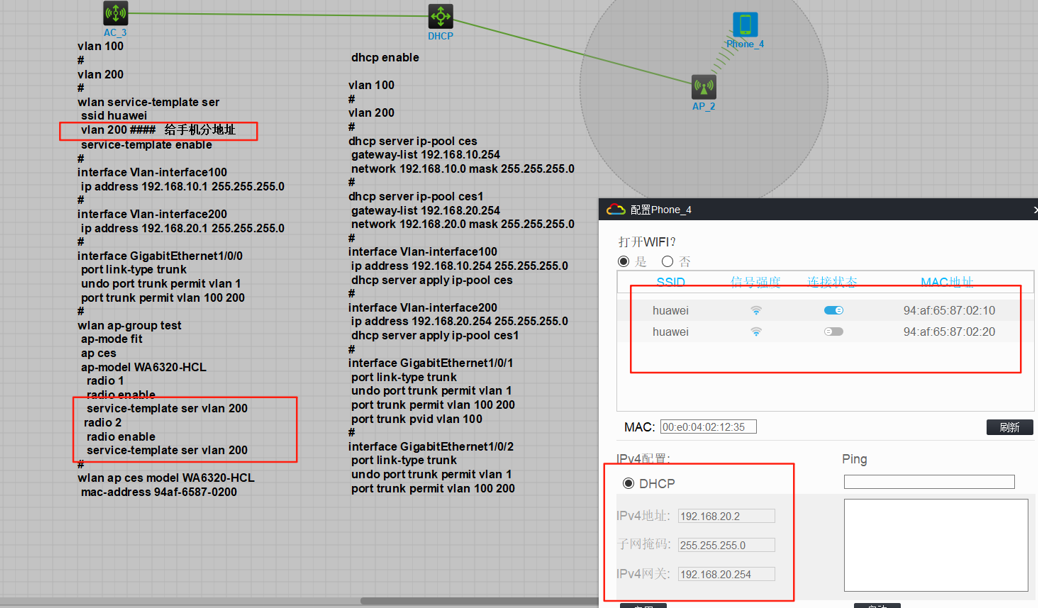
AC 能查到无线客户端,代表无线协商关联成功;终端 DHCP 获取失败、VLAN11 无 IP: 1、优先确认 SSID 转发模式:本地转发场景,AP 上行 Trunk 必须放行业务 VLAN11,不放行则 DHCP 广播无法上传;集中转发则检查 AC 上 VLAN11 和 DHCP 配置; 2、检查 Vlanif11 接口、DHCP 地址池:网段匹配、网关正确、地址池有剩余地址; 3、排查链路中间设备(交换机、防火墙)是否有 ACL、dhcp-snooping、安全策略拦截 UDP67/68 DHCP 报文; 4、校验 wlan 服务模板绑定的 VLAN 是否为 11,是否配置错误。
暂无评论
编辑答案
➤


✖
亲~登录后才可以操作哦!
确定
✖
✖
你的邮箱还未认证,请认证邮箱或绑定手机后进行当前操作
✖
举报
×
侵犯我的权益
>
对根叔社区有害的内容
>
辱骂、歧视、挑衅等(不友善)
侵犯我的权益
×
侵犯了我企业的权益
>
抄袭了我的内容
>
诽谤我
>
辱骂、歧视、挑衅等(不友善)
骚扰我
侵犯了我企业的权益
×
您好,当您发现根叔知了上有关于您企业的造谣与诽谤、商业侵权等内容时,您可以向根叔知了进行举报。 请您把以下内容通过邮件发送到 pub.zhiliao@h3c.com 邮箱,我们会在审核后尽快给您答复。
- 1. 您举报的内容是什么?(请在邮件中列出您举报的内容和链接地址)
- 2. 您是谁?(身份证明材料,可以是身份证或护照等证件)
- 3. 是哪家企业?(营业执照,单位登记证明等证件)
- 4. 您与该企业的关系是?(您是企业法人或被授权人,需提供企业委托授权书)
我们认为知名企业应该坦然接受公众讨论,对于答案中不准确的部分,我们欢迎您以正式或非正式身份在根叔知了上进行澄清。
抄袭了我的内容
×
原文链接或出处
诽谤我
×
您好,当您发现根叔知了上有诽谤您的内容时,您可以向根叔知了进行举报。 请您把以下内容通过邮件发送到pub.zhiliao@h3c.com 邮箱,我们会尽快处理。
- 1. 您举报的内容以及侵犯了您什么权益?(请在邮件中列出您举报的内容、链接地址,并给出简短的说明)
- 2. 您是谁?(身份证明材料,可以是身份证或护照等证件)
我们认为知名企业应该坦然接受公众讨论,对于答案中不准确的部分,我们欢迎您以正式或非正式身份在根叔知了上进行澄清。
对根叔社区有害的内容
×
垃圾广告信息
色情、暴力、血腥等违反法律法规的内容
政治敏感
不规范转载
>
辱骂、歧视、挑衅等(不友善)
骚扰我
诱导投票
不规范转载
×
举报说明
暂无评论