一.iLO Web管理界面查看CPU、内存、PCIe板卡硬件信息
1.
HPE Gen10及Gen10 Plus系列服务器
①
在iLO5 Web管理界面,依次选择[System information/Processors],即可在汇总页面查看到服务器当前CPU相关信息。

②
在iLO5 Web管理界面,依次选择[System information/Memory],即可在汇总页面查看到服务器当前内存相关信息。

③
在iLO5 Web管理界面,依次选择[System information /Storage],即可在汇总页面查看到服务器当前阵列卡相关信息。

④
在iLO5 Web管理界面,依次选择[System information /Device Inventory],即可在汇总页面查看到服务器当前PCIe板卡相关信息。

2.
HPE Gen8及Gen9系列服务器
①
在iLO4 Web管理界面,依次选择[System information/Processors],即可在汇总页面查看到服务器当前CPU相关信息。

②
在iLO4 Web管理界面,依次选择[System information/Memory],即可在汇总页面查看到服务器当前内存相关信息。

③
在iLO4 Web管理界面,依次选择[System information /Storage],即可在汇总页面查看到服务器当前阵列卡相关信息。

④
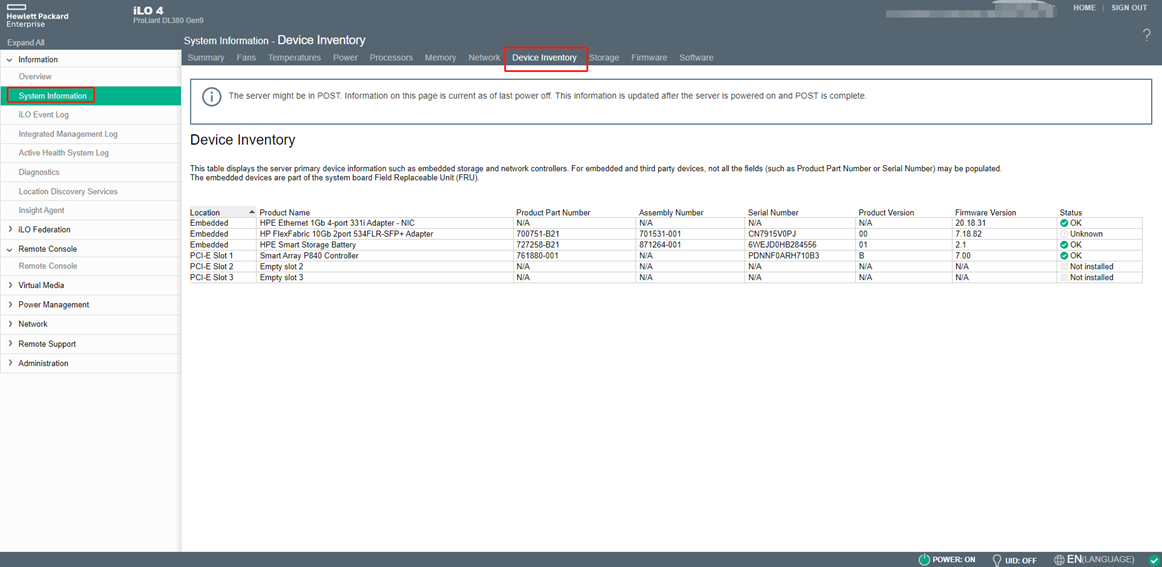
在iLO4 Web管理界面,依次选择[System information /Device Inventory],即可在汇总页面查看到服务器当前PCIe板卡相关信息。
二.BIOS 界面查看CPU、内存、PCIe板卡、阵列卡硬件信息
1. HPE Gen10及Gen10 Plus系列服务器在BIOS界面查看硬件信息
①
服务器开机按
[F9] 进入 BIOS 界面。

②
在BIOS界面,选择 [System Information/Processor Information],即可查看到服务器当前CPU的相关信息


③
在BIOS界面,选择[System Information/Memory Information],即可查看到服务器当前内存的相关信息。


④
在BIOS界面,选择[System Information/PCIe Device Information],即可查看到服务器当前PCIe板卡的相关信息。


2.
HPE Gen8及Gen9 系列服务器在BIOS界面查看硬件信息
①
服务器开机按
[F9] 进入 BIOS 界面。

②
在BIOS界面,选择 [System Information/Processor Information],即可查看到服务器当前CPU的相关信息


③
在BIOS界面,选择[System Information/Memory Information],即可查看到服务器当前内存的相关信息。


④
在BIOS界面,选择[System Information/PCIe Device Information],即可查看到服务器当前PCIe板卡的相关信息


